
Transbrake for Ford Explorer ST Now Available!
Transbrake Launches The Explorer ST Past Sanity!
The Explorer ST is the surprise knockout of Ford’s newer generation of EcoBoost vehicles, offering tons of versatility. Take the whole family to the track with you and lay down 400+ horsepower when you get there. Even better: that’s in stock form, before we even turn it up a notch with COBB Off the Shelf tunes or a custom calibration with one of our COBB ProTuners. With just a tune, you can add who 53 hp and 45 ft/lb from the comfort of the driver’s seat. With Explorer ST Transbrake enabled, you can take it a step further.
If you’re looking to tune your ExST, the team here at COBB’s got you covered. If your Explorer is already tuned with an Accessport and you want even more out of your ST at the track – good news! We’re excited to announce Explorer ST transbrake, bump box, and creep functionality on the Accessport, straight out of the box. Thanks to COBB’s near-decade of experience with Ford transbrakes, you can head to the track with years of engineering at the ready.
Already own an Accessport for your Explorer ST? We got you! With a simple firmware update, you can unlock new maps and features such as Transbrake, Bump Box, and Creep Mode, giving you the ever-impactful edge when you’re lining up at the track. The combination of these COBB Custom Features can lead to quicker 60 foot times and lower ETs. To grab these features for yourself, just use Accessport Manager to update your AP to firmware version 1.7.6.0-26949, and use the included v104 OTS maps. Click here for instructions on how to update your Accessport. Once your firmware is current, simply go to “Tune” > “Restore OTS Maps.” Flash the appropriate v104 map for your modifications, and you’ll be set.

What Features Have Been Added to ExST Accessports?
Transbrake
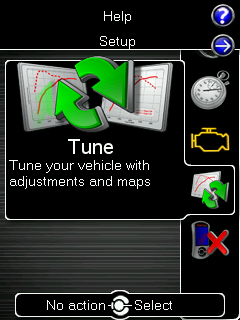
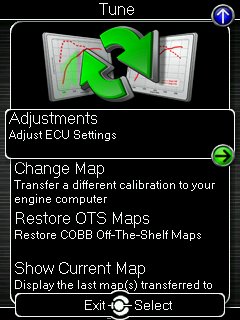
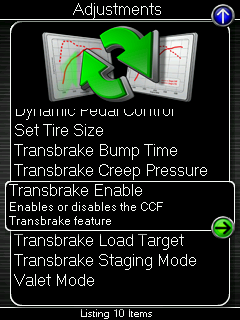
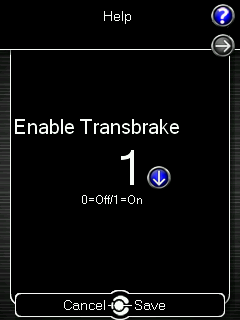
We here at COBB know that a good launch is one of the most critical parts of a drag race. The new Explorer ST transbrake launch control feature makes sure you’ve got that covered. Not only will your 60 foot times be more consistent, they’ll be quicker, too. Transbrake allows you to build more (and more consistent) boost compared to simple foot braking. To enable the transbrake feature go to “Tune” > “Adjustments” > “Enable Transbrake” > Set the value to “1” using the up button and press enter (center button).
 |
 |
 |
 |
Note: the default RPM setting with the transbrake feature enabled is 2500RPM. Greater boost pressures can be attained through increasing the Transbrake Load Target. Before continuing further, be aware that transmission braking features can be hard on your engine, clutches, transmission, axles, tires, and differential. Only use these features if you accept all risks and responsibilities.
Staging Mode
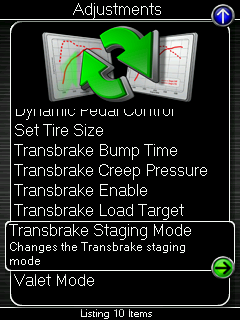
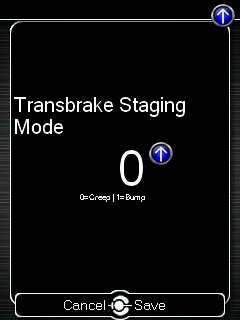
In a race where every inch matters, staging perfectly is a science. Explorer ST transbrake on the COBB Accessport makes it easier. Choose between two different staging modes: Creep and Bump. Pick the method that suits your preference, and fine-tune for your needs and driving style. This can be done through the “Tune” > “Adjustments” > “Transbrake Staging Mode” > Set the value to “0” to use the Creep method, or set the value to “1” to use Bump Box for staging.
|
|
 |
 |
Note: If running a stock torque converter, you are limited to ~3100 RPM. To reach higher RPMs, additional driveline modifications will be required.
Creep Mode
Creep Mode allows for a graceful and gradual movement forward while lining up at the tree on the transbrake. This approach can be preferred to the more aggressive lurch of the Bump option. With Creep Mode enabled, press and hold the left paddle to engage the transbrake functionality. Then use the right paddle to slowly creep forward.
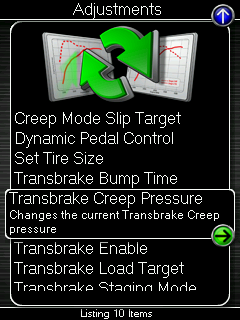
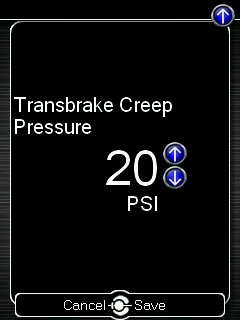
You can change the rate of “creep” by going to “Tune” > “Adjustments” > “Transbrake Creep Pressure” > Set the value to your desired pressure using the up/down buttons and press enter (center button).
|
|
 |
 |
Bump Box
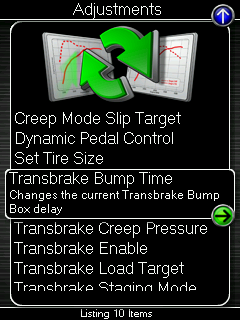
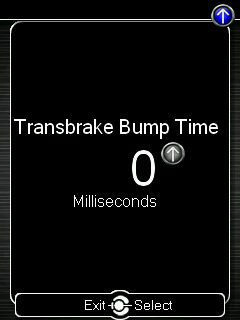
The Bump Box feature allows you to “bump” the car forward into staging while sitting on the Transbrake. Depending on RPM & boost targets and how fast the tree operator wants to start the lights, bump box can be a major benefit. The bump box can buy you the time you need to reach a desired RPM or build enough boost. With this feature, you are able to build boost and RPM while staging the car.
You can change the delay time of each “bump.” This can be adjusted through “Tune” > “Adjustments” > “Change Transbrake Bump Time” > Set the value to your desired bump using the up/down buttons and press enter (center button).
|
|
 |
 |
Increasing Load Target
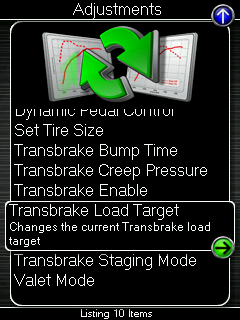
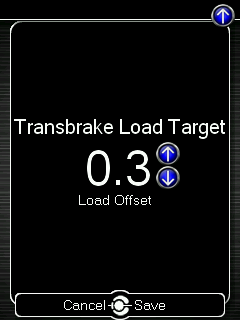
Dialing in the perfect launch can be a difficult process. Tires, temperature, and track prep are just the tip of the iceberg. Those factors (and plenty more) can lead to different traction at the start line. Conditions can change throughout the day, and the ability to tweak your settings on the fly is a game-changer. If you’re bogging or blowing the tires off, a simple adjustment on the Accessport may be all you need. You can adjust load target between passes to get that hook and boogie you’re after.
To change the delay time of each “bump”, go to “Tune” > “Adjustments” > “Transbrake Load Target” > Set the value to your desired bump using the up/down buttons and press save (center button).
|
|
 |
 |